
Is Venmo Safe for Facebook Marketplace? 6 Scams to Avoid & How to Stay Safe
“Just Venmo me.” It’s a phrase we hear almost every day. It is fast, easy, and usually fee-free, which makes it incredibly tempting for buying and selling on social platforms. But is Venmo safe for Facebook Marketplace?
The direct answer is: Generally, no. Venmo was designed for splitting pizza bills with friends, not for transacting with strangers. Unless you are meeting in person and strictly following a safety protocol (like scanning a QR code), you have zero protection. Using it incorrectly often means that once your money is gone, it is gone forever.
In this guide, we will break down exactly why scammers love Venmo, the specific scripts they use to trick you, and the only way to use the app without losing your shirt.
Why Scammers Prefer Venmo Over Other Payment Methods
To protect yourself, you first need to understand the economic and technical reasons why fraudulent sellers and buyers insist on using Venmo. It is not just about popularity; it is about the mechanics of the app.
It Functions Like Digital Cash
You should view a standard Venmo transaction exactly like handing cash to someone on the street. Once you send the funds, the transaction is instant and generally irreversible. Unlike a credit card transaction where you can call your bank to dispute a charge, Venmo payments are authorized by you. Scammers know that once the money leaves your account, there is very little recourse for you to get it back.
Friends and Family Default Setting
By default, Venmo transactions are categorized as personal payments. This setting assumes that you know and trust the person you are paying. Consequently, these transactions carry zero purchase protection. Scammers rely on this default setting. They know that if they can convince you to send money this way, Venmo will not intervene if the deal goes sour because the app assumes you simply sent money to a friend.
Misunderstanding of Brand Association
Many users operate under the false assumption that because Venmo is owned by PayPal, it carries the same inherent protections. This is a dangerous misconception. PayPal is built with robust commercial dispute resolution tools because it is designed for e-commerce. Venmo is designed for social payments between peers. The risk models and support structures are completely different, and scammers exploit this trust in the parent brand.
Exploiting the Desire for Convenience
Scammers are excellent at manipulating user psychology. They know that both buyers and sellers want to avoid fees. Facebook Marketplace Checkout charges sellers a 5% fee, and PayPal Goods & Services charges nearly 3%. Venmo personal transfers are free. When a scammer suggests using Venmo to save everyone some money, it sounds like a mutually beneficial favor. This small convenience is often the hook that leads users to lower their guard.
Common Venmo Scams on Facebook Marketplace
Fraud on Facebook Marketplace is rarely random. It almost always follows a specific script. If you can recognize the script, you can avoid the financial loss. Here are the six most common variations you will encounter.
Business Account Upgrade Scam
This is currently the most prevalent scam on the platform. A buyer will message you and agree to your asking price immediately. They will then ask for your email address to send the payment. This is the first warning sign, as Venmo does not require an email address to send funds; a username is sufficient.
Once they have your email, you will receive a message that looks like it comes from Venmo. The email will state that the buyer has sent the money, but it cannot be credited to your account until you upgrade to a business account. To do this, the email claims the buyer must send an additional sum, often $300 or $500, which you must then refund to them. In reality, no money was ever sent to you. If you refund the buyer, you are sending your own money to the scammer.
Fake Payment Screenshot
This tactic targets sellers during in-person meetups or online negotiations. The buyer claims to have sent the payment and provides a screenshot as proof. The screenshot will show a transaction confirmation that looks legitimate. However, these images are easily fabricated using photo editing software. If you hand over the item based on a screenshot without checking your own app, you will likely realize later that no money was ever transferred.
Overpayment Scam
In this scenario, a buyer sends you a check or a digital transfer for an amount significantly higher than the selling price. For example, if you are selling a sofa for $50, they might send you $500. They will claim this was an accident and ask you to transfer the difference back to them.
The original $500 transfer is usually made using a stolen credit card or a compromised bank account. When the legitimate owner of that account reports the fraud, Venmo will reverse the initial transaction and take the $500 back from you. However, the refund you voluntarily sent to the scammer is considered a separate, authorized transaction. You will lose the refund amount and the initial payment.
Relative Pickup Scheme
This scam is designed to separate the payment from the physical exchange of goods. A buyer will contact you saying they are interested in your item but are currently out of town or busy at work. They will offer to pay you via Venmo immediately to secure the item, but they will send a brother, cousin, or mover to pick it up.
This complicates the transaction trail. Often, after the item is picked up, the buyer will file a claim stating the transaction was unauthorized. Since you did not meet the person who paid you, it is difficult to prove the transaction was legitimate.
Google Voice Code Verification
This is an identity theft tactic that often starts on Facebook Marketplace. A buyer will express interest but claim they want to verify you are a real person before meeting. They will tell you they are sending a six-digit code to your phone number and ask you to read it back to them.
That code is actually a verification code from Google Voice. By giving them the code, you are authorizing them to create a Google Voice number linked to your personal phone number. They can then use this anonymous number to scam other people while hiding their identity behind your phone number.
Shipping Bait and Switch
This occurs when a seller lists an item as local pickup only, but a buyer insists on shipping. They will try to move the conversation off Facebook Messenger and ask to pay via Venmo for the item plus shipping costs. By moving the transaction off the Facebook platform, they bypass the secure checkout system. Once you receive the Venmo payment and ship the item, you are vulnerable to payment reversals, or if you are the buyer, the seller may simply never ship the item.
Venmo vs. PayPal: A Comparison for Marketplace Users
Here is a breakdown of the differences between Venmo and PayPal:
| Feature | Venmo | PayPal |
| Primary Use | Splitting bills with friends (Social) | E-commerce and Business (Commercial) |
| Buyer Protection | Off by default. Must be manually toggled on. | On by default for commercial transactions. |
| Transaction Privacy | Public by default. Strangers can see who you pay. | Private. Only buyer and seller see details. |
| Dispute Resolution | Difficult process, favors authorized access. | robust Resolution Center for disputes. |
| Seller Fees | Free (Personal) or 1.9% + $0.10 (Protected) | ~2.99% + fixed fee (Goods & Services) |
| The Verdict | Risky. Only safe if strict protocols are followed. | Safer. Better built-in tools for strangers. |
It is important to understand the functional differences between Venmo and PayPal to make an informed decision. While they are corporate siblings, their utility for buying and selling with strangers differs significantly.
PayPal is generally safer for Marketplace transactions because its default setting for goods and services includes buyer protection. When you pay a merchant on PayPal, the system assumes it is a commercial transaction and protects the buyer if the item is not received.
Venmo, on the other hand, defaults to a personal transaction mode. It does have a purchase protection option, but it must be manually selected. Furthermore, Venmo transactions are public by default, meaning strangers can potentially see your transaction history unless you change your privacy settings. PayPal transactions are private.
For most transactions with strangers, PayPal Goods and Services offers a more robust and automatic safety net compared to Venmo.
How to Use Venmo Safely on Facebook Marketplace
If you prefer to use Venmo or if a buyer insists on it, there are ways to conduct the transaction safely. You must follow a strict protocol to minimize risk.
Protocol for Local Pickup
The safest way to use Venmo is during an in-person exchange. However, simply meeting in person is not enough.
First, always meet in a public location such as a police station parking lot or a busy coffee shop. When it is time to pay, open the Venmo app and scan the other person’s QR code directly.
Most importantly, you must verify the transaction on your own device. Do not look at the buyer’s phone screen, as they could be showing you a fake app or a screenshot. Wait until you receive a notification on your own phone, open your Venmo app, and verify that the funds have actually been added to your balance. Do not hand over the item until you see the money in your own account history.
Protocol for Shipping Items
If you are buying an item that requires shipping and you must use Venmo, you have only one option for safety. You must use the Purchase Protection feature.
When you are on the payment screen in Venmo, looking at the amount and the note field, there is a toggle switch or a shield icon labeled Turn on for purchases. You must activate this. This service costs the seller a fee of 1.9% plus $0.10.
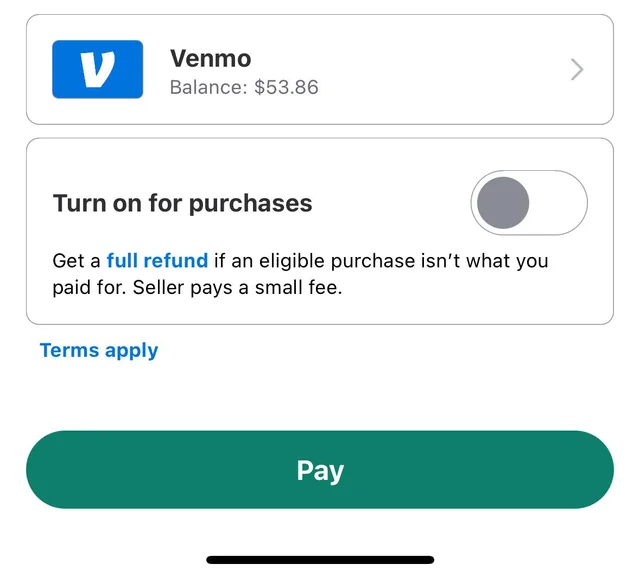
If you are the buyer, it is often helpful to offer to cover this fee to reassure the seller. If a seller refuses to accept a payment with purchase protection even after you offer to pay the fee, you should cancel the transaction immediately. There is no legitimate reason for a seller to refuse this protection other than an intent to defraud.
Understanding the Role of Facebook
It is crucial to understand where the authority of Facebook ends. Facebook Marketplace operates in two distinct modes: On-Platform and Off-Platform.
On-Platform transactions occur when you click the Buy Now button within Facebook. You enter your payment information into Facebook, and the platform holds the funds. If the item is not delivered, you can apply for a refund through Facebook Purchase Protection.
Off-Platform transactions occur when you arrange a deal through Messenger and pay using an external app like Venmo. Once you move the financial part of the transaction to Venmo, you have left the jurisdiction of Facebook. Facebook cannot see the transaction, they cannot reverse it, and they will not refund you if you are scammed. Support tickets regarding Venmo scams will essentially be closed with a reminder that off-platform transactions are done at your own risk.
Conclusion
The use of Venmo on Facebook Marketplace carries inherent risks because the app prioritizes speed and social connection over commercial security. While it is possible to use it without being scammed, it requires a high level of vigilance and a refusal to compromise on safety protocols.
If you are meeting locally, cash remains the most secure form of payment. It eliminates the risk of digital reversal and identity theft. If you are shipping an item, sticking to the official Facebook Checkout system or PayPal Goods and Services provides a much stronger safety net than Venmo. If you do choose to use Venmo, remember to treat it like digital cash: verify everything yourself, never share your email address, and use the purchase protection toggle for any transaction where you are not handing over cash and goods simultaneously.